I like a completely blank desktop. But recycle bin clutters it up and it isn’t obvious how to get rid of it. Fortunately it’s easy enough to banish the recycle bin – it’s just a few clicks. But it’s not intuitive. Here’s how to remove the recycling bin from your desktop in Windows 10:
1.Right click on the blank desktop and go to “Personalise”
2. Click “Themes”
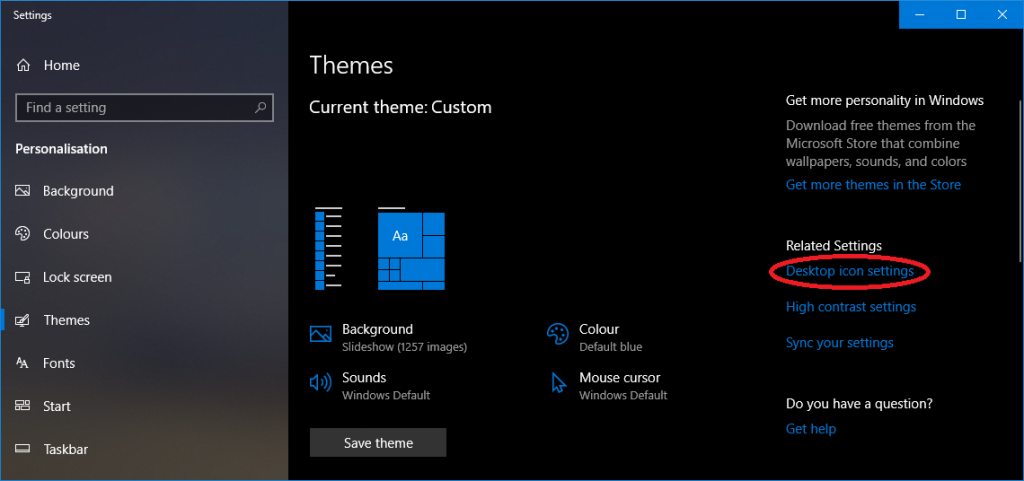
3. Click “Desktop icon settings” on the right hand side:
4. In the window shown below, untick “Recycle Bin”. Also untick “Allow themes to change desktop icons”:
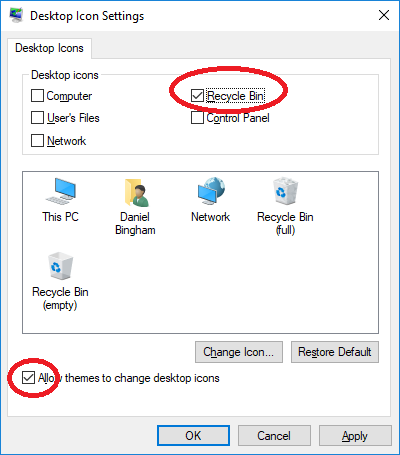
Click OK. Done!
https://shorturl.fm/GkqlR
https://shorturl.fm/PwemU
https://shorturl.fm/7MUDa
https://shorturl.fm/r6nFY
https://shorturl.fm/KQ4wf
https://shorturl.fm/MRZqO
https://shorturl.fm/QxadE
zz4xyf
https://shorturl.fm/25LLI